
Search the Help Center
Scheduling Your Exam
The PE exam is administered year-round at Pearson VUE testing centers. You can locate nearby testing centers by searching Google Maps for Pearson VUE Testing Center or by using Pearson VUE – Find a test center.
Once you are eligible to take the PE exam, you will register and schedule your appointment through your MyNCEES account. During registration, you’ll be able to choose from available testing centers and exam dates.
Schedule your exam as early as possible. Testing centers often fill several weeks or even months in advance, especially during popular testing periods. Waiting too long to schedule may leave you with limited testing dates or require you to travel farther than expected.
If you plan to use our Retake Guarantee, make sure you schedule your exam early enough to satisfy the eligibility requirements. One of the requirements is that you take the PE exam within one calendar month after your paid enrollment expires. Please see the Retake Guarantee page for complete eligibility requirements.
Because testing appointments are managed by NCEES® and Pearson VUE, exceptions to the Retake Guarantee cannot be made if you are unable to schedule an exam before your eligibility window closes. It is your responsibility to schedule your exam with sufficient time.
Before Exam Day
A little preparation before exam day can help reduce stress and avoid unnecessary surprises.
Before your exam, you should:
- Verify your exam appointment date, time, and testing center location.
- Review the current NCEES® Examinee Guide and testing policies.
- Make sure your identification meets NCEES® requirements.
- Plan to arrive early to allow time for check-in and security procedures.
The PE exam is administered using computer-based testing (CBT), so you should also be comfortable using the on-screen reference handbook, search function, and calculator before exam day.
NCEES® Examinee Guide
The NCEES® Examinee Guide is the official resource for everything related to the PE exam experience. I strongly recommend reviewing the most recent version before your exam, even if you’ve taken an NCEES® exam in the past.
The guide covers topics such as:
- Registering and scheduling your exam
- Rescheduling or canceling your appointment
- What to bring on exam day
- Identification requirements
- Approved calculators and reference materials
- Testing center rules and security procedures
- Scheduled and unscheduled breaks
- The computer-based testing (CBT) interface and exam format
- Alternative item types and pre-test questions
- Receiving your exam results and interpreting your diagnostic report
Reading the NCEES® Examinee Guide before exam day will help you understand exactly what to expect and avoid common issues that could delay or even prevent you from testing.
Because NCEES® updates the Examinee Guide periodically, always download and review the latest version directly from the NCEES® website before your exam.
For the latest Examinee Guide, visit Examinee Guide | NCEES.
During the Exam
The Electrical and Computer: Power PE exam consists of 80 problems.
A few tips for exam day:
- Pace yourself throughout the exam rather than spending too much time on any one problem.
- Use the flag feature to mark questions you want to revisit.
- Answer every question. There is no penalty for incorrect answers.
- Remember that only correct answers contribute to your score.
Advanced test taking strategies for the PE exam will be taught during Class 1 – How to Pass the PE Exam.
Exam Format
The Electrical and Computer: Power PE Exam consists of 80 questions and is administered using computer-based testing (CBT). Your total appointment time is 9 hours, which includes:
- 2 minutes to review and accept the NCEES® Nondisclosure Agreement
- 8 minutes for the CBT tutorial
- 8 hours to complete the exam
- One optional scheduled break of up to 50 minutes approximately halfway through the exam
The optional scheduled break is generally intended for lunch.
The exam is divided into two sections. You’ll receive the entire 8-hour testing time when the exam begins, so there are no individually timed sections. You may allocate your time however you choose.
After completing approximately half of the questions, you’ll be prompted to review your answers before submitting the first section. Once you submit the first section, you cannot return to those questions. Any unused time from the first section automatically carries over to the second half of the exam. After submitting the first section, you may take the optional scheduled break before continuing with the remainder of the exam.
Every examinee receives a unique version of the exam, but each exam is assembled to follow the same exam specifications and maintain a comparable level of difficulty.
At your workstation, the testing center will provide you with a reusable scratch booklet and felt-tip marker for your calculations and notes. If you fill a booklet or your marker stops writing well, simply raise your hand and the proctor will exchange it for a new one.
Pre-Test Questions
The CBT version of the PE exam includes a small number of pre-test questions.
These questions are being evaluated by NCEES® for possible use on future exams. They are not scored and do not affect your exam result. Pre-test questions are mixed throughout the exam and are not identified, so there is no way to know which questions they are. Treat every question as though it counts.
The only way to know the number of pre-test questions included in your exam is if you do not pass the PE exam and receive a diagnostic report.
Exam Results
Most computer-based PE exam results are released on a Wednesday, typically 7 to 10 days after your exam. You will receive an email from NCEES® when your results are available, and you can view them by logging into your MyNCEES account.
Results are reported simply as:
- Pass
- Fail
Diagnostic Report
If you do not pass the exam, NCEES® will provide a diagnostic report showing your relative performance in each major exam topic. This report is designed to help identify strengths and weaknesses so you can better focus your preparation before taking the exam again.
If you pass the exam, a diagnostic report is not provided.
Example diagnostic report:
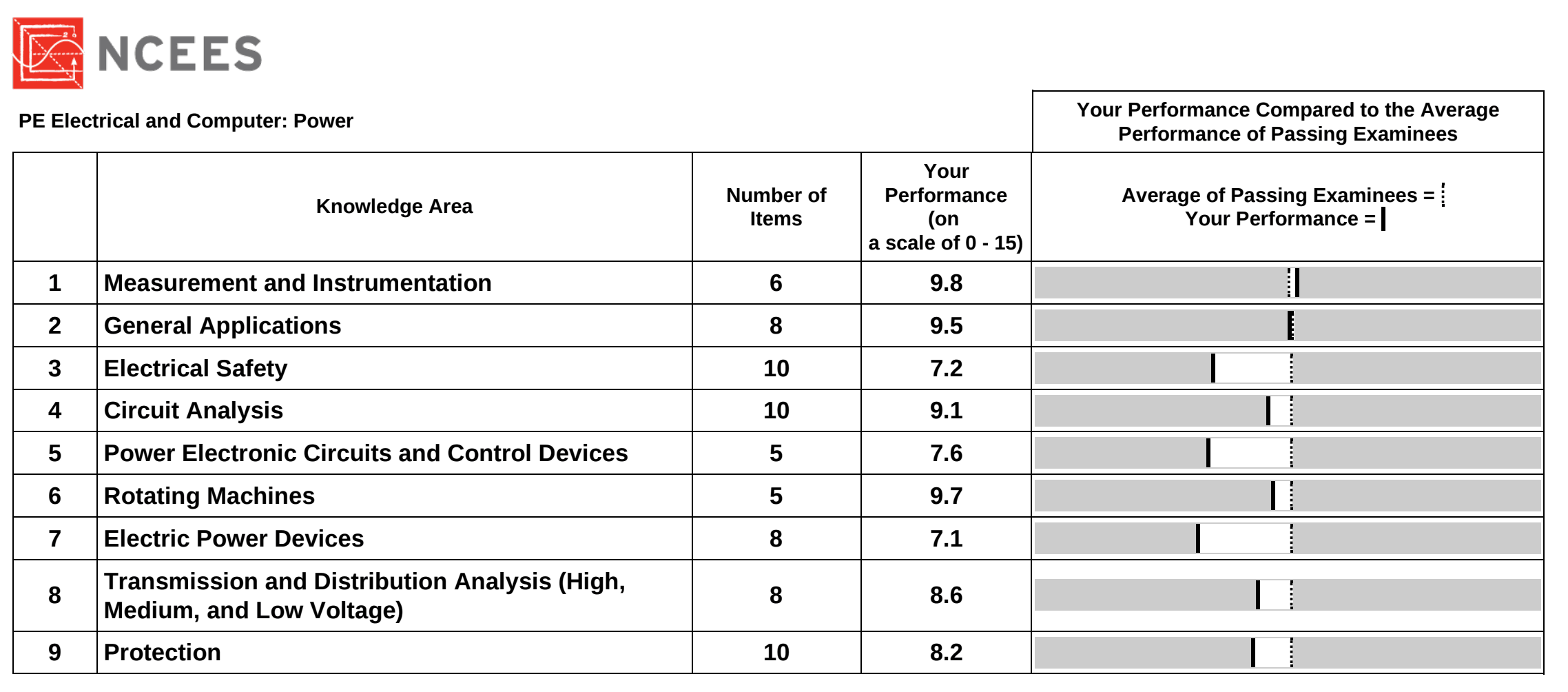
You can determine how many pre-test questions were included on your exam by adding the total number of scored questions listed across all exam topics in your diagnostic report, then subtracting that total from the 80 questions on the exam. The difference is the number of pre-test questions that were included in your exam but were not scored.
For example, in the above diagnostic report, there are a total of 70 Number of Items across all 9 exam Knowledge Areas. This means that for this particular PE exam reflected in this diagnostic report, 10 out of the total 80 exam problems were pre-test questions.
How to Interpret Your Diagnostic Report
Your diagnostic report is designed to help you identify where your study efforts will have the greatest impact before retaking the PE exam. Rather than focusing on the individual scaled scores, pay close attention to the comparison chart on the right side of the report.
For each knowledge area:
- The solid vertical line represents your performance.
- The dashed vertical line represents the average performance of examinees who passed.
- The distance between the two lines indicates how your performance compared to the average passing examinee in that subject area.
- The farther your solid line is to the left of the dashed line, the greater your opportunity for improvement in that topic.
When deciding what to study, consider both your performance and the Number of Items in each knowledge area. Improving in a topic that contains 10 exam questions will generally have a greater impact on your next attempt than spending the same amount of time on a topic that contains only 5 questions.
Keep in mind that the comparison chart is not drawn to scale and is intended only to show your relative performance compared to the average passing examinee. It should not be used to estimate how close you were to passing or to calculate your exam score.
If you do not pass the PE exam and claim your Retake Guarantee, you’ll receive access to a recorded webinar that explains how to interpret your NCEES® diagnostic report and develop an effective study plan for your next exam attempt.
The webinar covers how to identify your weakest subject areas, prioritize your study time, and use your diagnostic report to maximize your chances of passing on your next attempt.
Scaled Score
NCEES uses a scaled scoring process for all computer-based PE exams. Your exam is scored based on the number of correct answers, and no points are deducted for incorrect answers. The raw score is then converted to a scaled score that accounts for minor differences in difficulty between different versions of the exam.
Unfortunately, it is impossible to determine the actual number of problems you answered correctly.
NCEES does not publish:
- Your raw score
- The passing score
Instead, your official result is reported simply as Pass or Fail.
All examinees are evaluated against the same minimum competency standard established by licensed professional engineers and psychometric experts.
To learn more about how NCEES® scores the PE exam, visit Exam Scoring | NCEES.
Pass Rates
The NCEES® Electrical and Computer: Power PE Exam is a challenging professional licensing exam, and not everyone passes on their first attempt.
Historically, first-time examinees consistently achieve significantly higher pass rates than repeat examinees. This highlights the importance of being thoroughly prepared before sitting for the exam. While many engineers do pass on a subsequent attempt, the statistics show that taking the exam only when you are truly ready gives you the best chance of success.
NCEES® updates PE exam pass rates twice each year, typically in January and July. Because these statistics change over time, refer to the official NCEES® PE Exam Pass Rates page for the most current information.
To view the most up-to-date pass rates, visit PE Exam | NCEES and navigate to Other Resources > PE EXAM PASS RATES at the bottom of the page.